Advanced File & Folder Comparison on iOS — FileBrowser Professional
See the differences. Take control. Sync with confidence.
Stratospherix revealed a major enhancement to its iOS and macOS file management product FileBrowser Professional. With the introduction of an advanced Compare Files and Folders mode, professionals and power users can now visually analyze, and synchronize files between any cloud or network locations with unprecedented precision and ease.
Built for users who demand desktop-style control from their iPhone or iPad, this comparison feature elevates FileBrowser Professional above conventional mobile file managers.
Key Benefits of the Comparison Mode
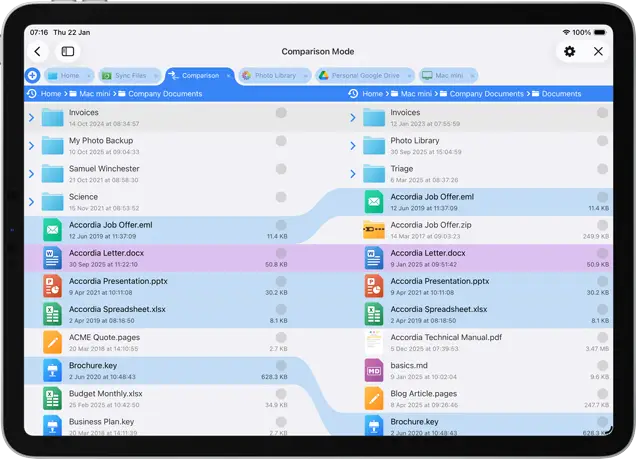
Side-by-Side Folder Analysis
Users can open any two folders in comparison mode to instantly identify matching files, missing items, and differences in size or modification date.
This visual overview dramatically simplifies tasks like:
- Identify what’s the same
- Spot what’s changed
- Decide what action to take—fast
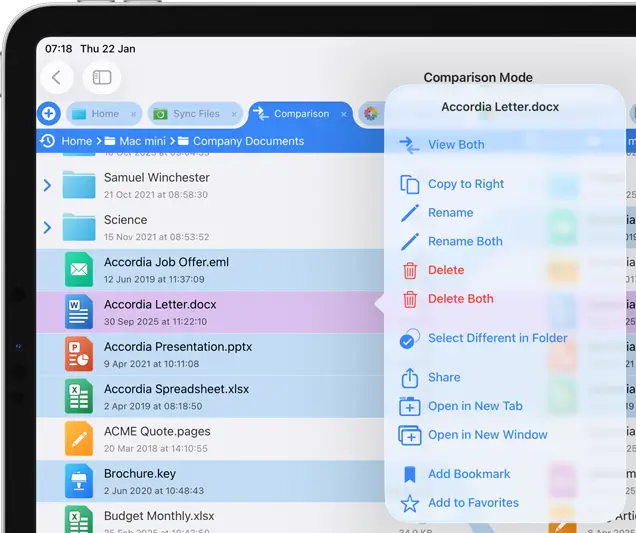
Actionable File Controls
Long-press any file in Compare mode to:
- Preview documents side by side
- Copy files between folders
- Rename or delete items
- No extra navigation required—everything happens in context.
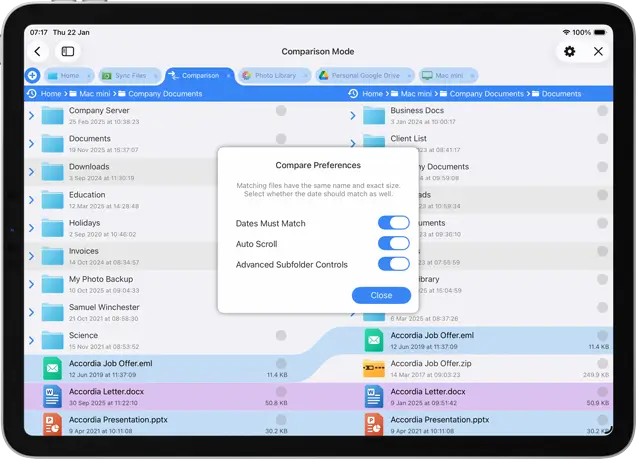
Custom Matching Criteria
Files with identical names, sizes and last modified dates are highlighted in blue. Different files are shown in purple. Since some file systems don't show accurate timestamps, you can choose to ignore them.
Synchronized Navigation
Optional auto-scroll synchronizes movement through both compared folders, while advanced subfolder controls let users expand deeper structures during comparison, making it easier to track changes across long file lists.
Built for Power Users
This update underscores Stratospherix’s ongoing mission to deliver powerful, intuitive file-handling capabilities on iOS that rival traditional computer workflows. It’s ideal for IT professionals, business users, and anyone who needs accuracy and control when managing files on the go.
FileBrowser Professional is available now on the App Store as a one-time purchase with support across iPhone and iPad devices. Additional features include advanced connection types, additional cloud integration, robust search and automation tools, and customizable file operations.
Our macOS version, FileBrowser Pro, is also available (seperate purchase).

FAQ
-
What types of locations can I compare?
You can compare folders from virtually any supported - location, including:
- Cloud storage services
- Network shares (SMB, etc.)
- Local device storage iPad/iPhone
This allows seamless comparisons even across different storage types. -
Can I preview files during comparison?
Yes. You can preview supported documents side by side, making it easy to verify content before copying, deleting, or renaming files.
-
Can I control how files are matched during comparison?
Yes. You can customize the matching criteria to suit your workflow:
- Filename only
- Filename + file size
- Filename + file size + modification date
This flexibility ensures accurate comparisons for different use cases.
Download Now


