FileBrowserGO – iOS File Manager & Document Viewer
Manage All Your Files on iPhone & iPad
Easily Connect to over 15 cloud storage providers with multiple cloud accounts from your iPhone or iPad
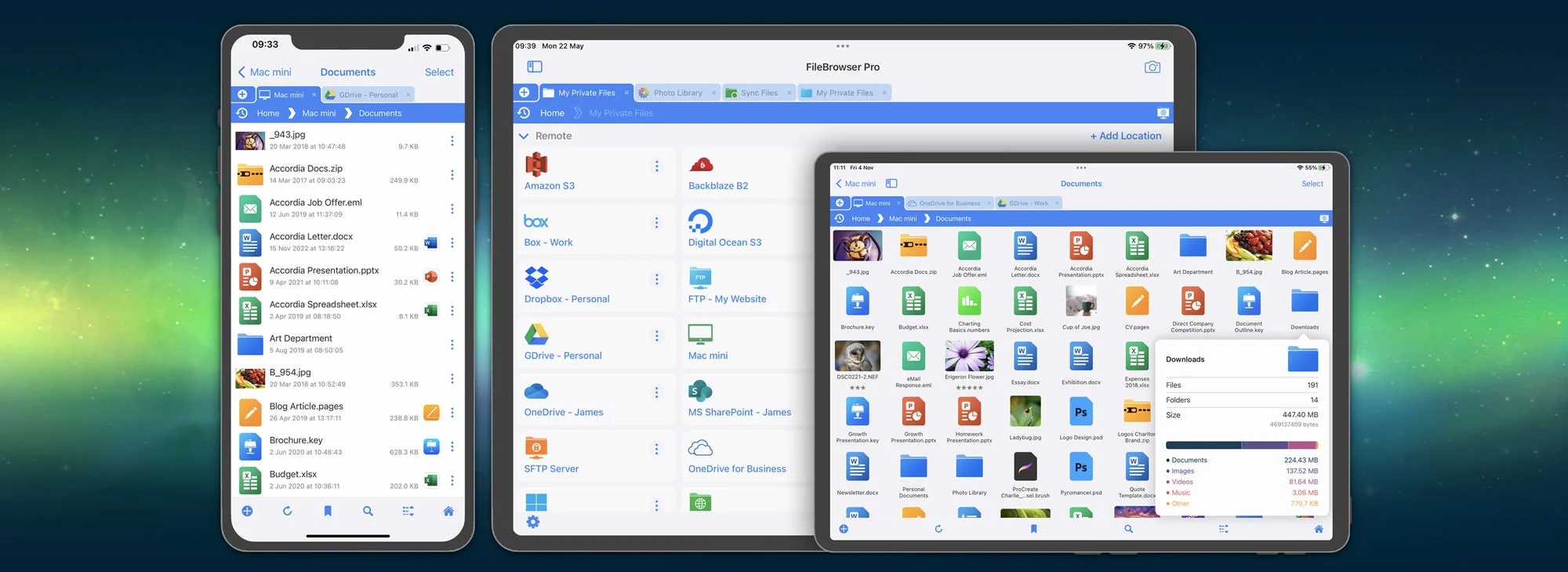
FileBrowserGO will change the way you manage files with your iPhone and iPad. Connect to all your cloud storage, home computers, NAS drives and your FTP / WebDAV Servers. Unlike Apple's Files app, connect to all your cloud storage accounts without having to install each cloud app seperately. You can also connect to multiple user accounts from the same cloud storage, allowing you transfer documents from one Google Drive account to another with ease.
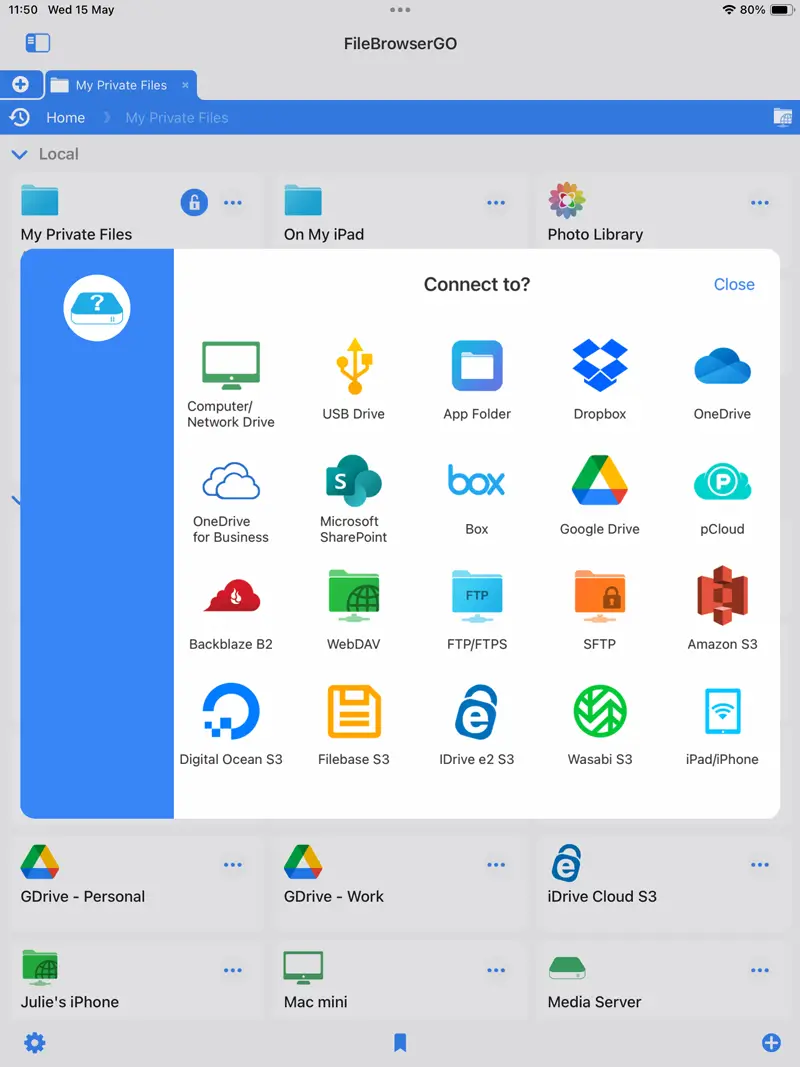
See what FileBrowserGO can connect to.

Fast File Browsing & Document Viewing
With FileBrowserGO's document viewers you can read and annotate PDFs, view ePub files and many other file formats. With FileBrowserGO's media player you can watch or listen to your media files on your iPad/iPhone or use Chromecast / Airplay to stream your media files to a TV or smart speakers. FileBrowserGO is more than just a File Manager.
Get an insight into what makes FileBrowserGO so great with it's intuitive UI & tabbed browsing. The powerful features include automated Backup and Sync tasks, PDF creation from images, and it's own Custom Task builder, to name a few.

Advanced Search & File Management
Speed up your workflow by creating powerful searches combining all the advanced search filters and regex expressions.
Filter your search results by type, date, size or XMP rating. Use regular expressions (Regex) to find files that have groups of numbers like this [0-9]{4}. Search for files that start with or end with a search parameter, or for files that dont match a query.
Save your search parameters and re-run them on any folders.
Advanced SearchConnect to Cloud & Network Storage
FileBrowserGO allows you to connect to over 20 different storage types. Managing all your files from one app has never been easier.
- Google Drive
- Google Cloud S3
- Dropbox
- Box
- OneDrive
- OneDrive for Business
- Microsoft SharePoint
- BackBlaze B2
- Amazon S3
- Digital Ocean
- FileBase S3
- iDrive e2 S3
- Wasabi S3
- NextCloud
- Storj
- Windows PC
- Mac (macOS)
- Linux
- NAS drives
- Portable WiFi Drives
- Synology NAS
- QNAP NAS
- SMB
- Samba
- WebDAV
- FTP
- SFTP
FileBrowserGO is a subscription based app, which gets all the new features first and includes all the pro features.

Why Choose FileBrowserGO?
You can use our comparison page to compare the different versions of FileBrowser.
How Does FileBrowserGO Compare to the Files app on iOS?
| Feature | iOS Files App | FileBrowserGO | Why it Matters |
| Cloud & Network Connections | Files App - SMB and iCloud Only. Any other cloud provider needs to be installed as a seperate app to access via the Files app. | FileBrowserGO - Over 22 Different Cloud providers and network protocols such as FTP, SFTP and WebDAV. | Access all storage in one place without juggling apps |
| Bulk Rename & File Editing | ✖ - Files App | ✔ - FileBrowserGO | Save time managing multiple files, edit EXIF, add counters |
| Tabbed Navigation | ✖ - Files App | ✔ - FileBrowserGO | Open multiple locations and drag files between tabs for faster multitasking |
| Advanced Search | ✖ - Files App | ✔ - FileBrowserGO | Filter by type, size, name, regex; save searches for repeated tasks |
| Password Protection | ✖ - Files App | ✔ - FileBrowserGO | Keep local files or the app itself secure |
| Media Streaming (AirPlay / Chromecast) | ✖ - Files App | ✔ - FileBrowserGO | Stream music, video, or images to smart devices |
| Compare Folder Contents | ✖ - Files App | ✔ - FileBrowserGO | Quickly spot differences between folders & easily apply changes |
| Edit In Place | ✖ - Files App | ✔ - FileBrowserGO | Make changes directly without moving files |
| Merge PDFs | ✖ - Files App | ✔ - FileBrowserGO | Combine PDFs easily |
| Sync & Backup Files | ✖ - Files App | ✔ - FileBrowserGO | Automate file synchronization and backups between devices or cloud accounts |
| Automated Custom File Tasks | ✖ - Files App | ✔ - FileBrowserGO | Create workflows to save time on repetitive file operations |
| Advanced WebDAV Server | ✖ - Files App | ✔ - FileBrowserGO | Host your own WebDAV server directly from iPhone/iPad |

FileBrowserGO - The Best App Ever
This is the best app I have ever used on my iPhone. Its features are limitlessIrshath M - App Store - Read Full Review

FileBrowserGO - Amazing App
I don't think I've ever seen another app that provides as much value as this doesmr2279 - App Store - Read Full Review
FileBrowserGO - Awesome App!
It's fantastic. Very reliable, very fast. At the file management level it's the bestYayaCP - App Store - Read Full Review
FAQ
-
How much does FileBrowserGO cost a month?
FileBrowserGO costs $0.99 a month, we offer cheaper options for 6 or 12 month subscriptions.
-
How does FileBrowserGO's price compare to other apps?
FileBrowserGO is considerably more affordable than other file manager apps, and contains numerous powerful features and data security. We strive to keep the price of our apps as low as possible.
-
Are there any in-app purchases in FileBrowserGO?
No, the subscription price gives you access to all of FileBrowserGO's features.
-
Can I sync files between two cloud services?
Yes, create a Backup task from a GoogleDrive folder to a OneDrive folder for example or between any cloud service you have connected in FileBrowserGO.
-
Can I use my subscription on 2 devices?
Yes, if you have an iPad and iPhone under the same Apple account you can use FileBrowserGO on both devices.
-
How do I get support or help with FileBrowserGO?
For help, visit the Stratospherix support page, user guides, and FAQs on our site. You can also contact our support team directly via email for troubleshooting and setup assistance.
-
Why dont I download a free file manger app instead?
Ask yourself why a file manager app is FREE, then take a look at their App Store page's privacy section and see what information they are collecting and selling on to third parties. FileBrowserGO may cost cents per month but will never collect any information, you can check for yourself on our App Store page.

Unsure which version of FileBrowser is for you? Check out our comparison page.


