User Guide Full Index
 Connect to...
 Navigation
File Listing Options
Navigation
File Listing Options
 Selecting and Copying Files
- File Selection Mode
- Selecting Images in the Image Viewer
- Copying Files
- Drag and Drop
- AirDrop Files
- Copy Large files with macOS Finder
- Share Files
- Copy to iOS Clipboard
- eMail Files
- Download Files Using URL
 Viewing Documents
Editing Documents
Annotate/Markup
Viewing Documents
Editing Documents
Annotate/Markup
 Bulk Rename Tools
- Bulk Rename - Add text to filenames
- Bulk Rename - Add Index or Counter
- Bulk Rename - Find and Replace
- Bulk Rename - Rename with Dates
- Bulk Rename - Rename using EXIF Data
 Search
 Creating and Editing PDFs
 Working with Images
 Playing Movies
 Playing Music
- Supported Music Types
- Play Modes
- Queueing Tracks
- Speed Up/Slow Down Playback
- AirPlay Music
- Chromecast Music
- Recording Audio into FileBrowser
 Sharing Folders
 Files App Integration
 Advanced
Create and View Photo Slideshows on iPhone & iPad
FileBrowser for Education lets you create and play photo slideshows on your iPhone or iPad, providing playback controls and display options to showcase your images in a smooth, organised presentation.
Slideshow Current Folder
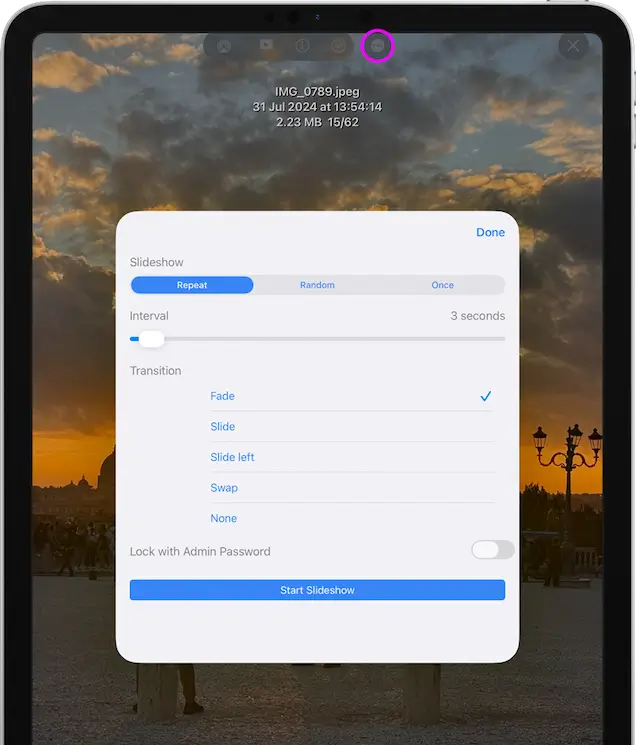
Open an image then tap the slideshow icon. If you want to change the slideshow settings tap the image actions menu and select "Slideshow Settings".
Save Slideshows
You can create and save Slideshows in two ways:
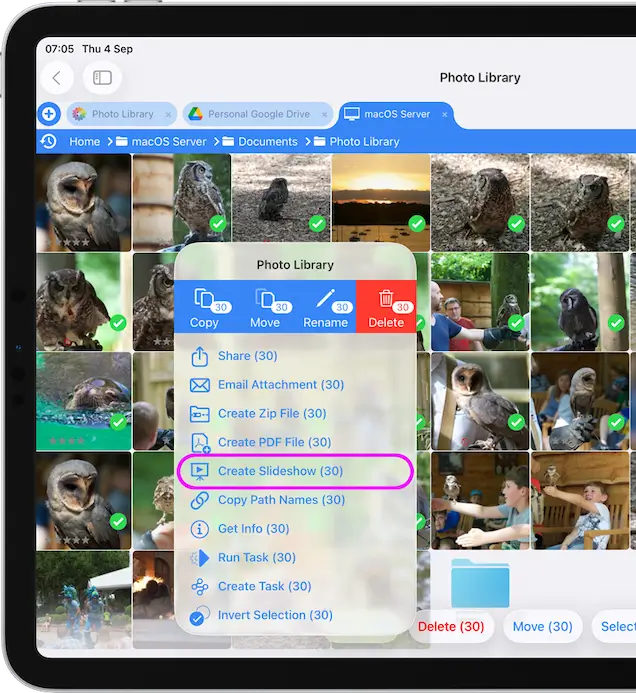
- Select multiple images and use the toolbar action menu to select "Create Slideshow".
- Tap a folder actions menu and select "Create Slideshow".
Note: This will include all the photos in any subfolders also.
If you can't see "Create Slideshow" you may need to Enable "Slideshows". Tap the Cog icon on the home screen and select "Admin Settings -> Feature Switches" and toggle on "Show Slideshow Location".
Manage Slideshows
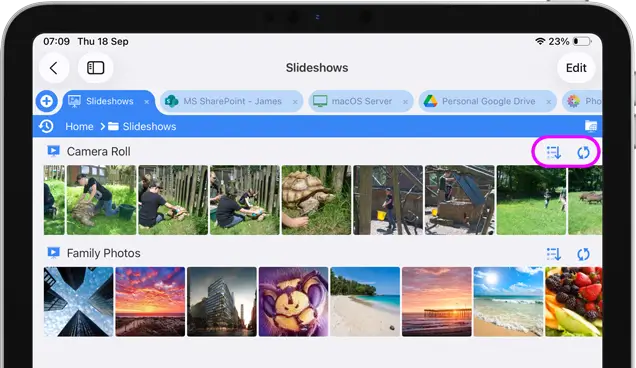
- On the home screen tap the "Slideshows" location.
- From here you can reorder your slideshow or refresh the slideshow contents
- To Delete or Rename Slideshows tap the "Edit" button in the top right.
Lock Slideshows with a Password
If you lock a slideshow you cannot exit the slideshow without entering your admin password. Simply toggle the switch in "Slideshow Settings". Great for Showing customers images without giving them access to all the files on your servers or iPad.
Note: You need to have enabled an Admin Password to use this setting.
Managing and Saving Slideshows is only available in FileBrowser Professional or FileBrowserGo.