FileBrowser Pro for Mac UserGuide
Follow Our Simple macOS Step by Step Guides
Learn how to connect to network storage and cloud services, browse files, transfer data, and use the advanced features of FileBrowser Pro for Mac. Whether you're managing files on your Mac, a NAS or remote servers, these guides explain each feature in detail.
Getting Started
Set your Home Folder
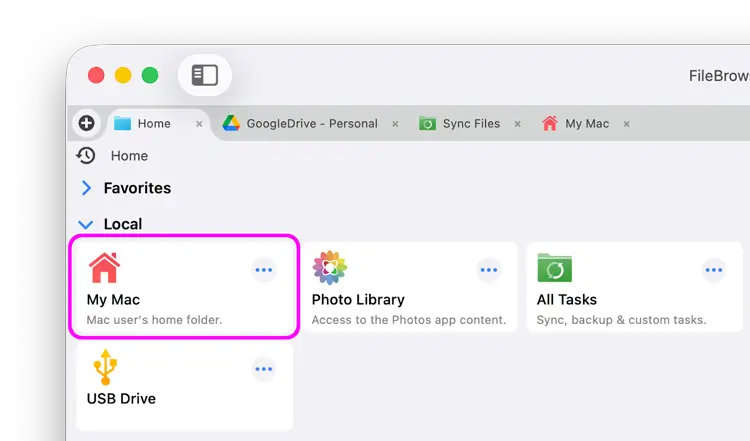
Simply click "My Mac" on the home screen, select your home folder on your Mac and click "Open".
You can re-link this by clicking the Actions menu on the "My Mac" location on your home screen and selecting "Unlink".

Getting Started
Start using FileBrowser Pro for Mac by setting up your home folder and connecting to the storage locations you use every day.
Connect to Mac (macOS)

Connect to shared folders on another Mac using SMB networking.
Connect to Windows PC
Access shared folders and files stored on Windows computers.
Connect to NAS Drives
Browse and manage files stored on Synology, QNAP and other NAS devices.
Connect to Cloud Storage
Add cloud storage accounts and work with your online files alongside local storage.
USB Drives
Open and manage files stored on external USB drives connected to your Mac.

Browse and Navigate Files
Learn how to move around your storage efficiently and customise how files are displayed.
Tabs
Open multiple folders at once and switch quickly between locations.
Breadcrumb
Navigate through folder hierarchies using the breadcrumb path.
Bookmarks
Save frequently used folders for fast access later.
History
Return to recently visited folders without browsing manually.
Favorites
Keep your most important storage locations close at hand.
View Modes
Choose between different file layouts to suit your workflow.
Sort Options
Sort files by name, size, type, date and other properties.

Copy, Move and Share Files
Transfer files between storage locations and share them using macOS features.
File Selection Mode
Select one or many files for copying, moving or deleting.
Selecting Images in the Image Viewer
Select images directly while browsing photos.
Copying Files
Copy files between folders, servers and cloud storage providers.
Drag and Drop
Move files quickly using drag and drop.
AirDrop Files
Share files instantly with nearby Apple devices using AirDrop.
eMail Files
Send files as email attachments directly from FileBrowser Pro.

View and Annotate Documents
Open documents, review PDFs and add annotations without leaving the app.
Get Folder Info
View detailed information about folders and their contents.
PDF Viewing Options
Read PDFs using the built-in document viewer.
ePub Viewer
Open and read ePub books stored locally or remotely.
Markup PDFs
Add notes, highlights and annotations to PDF documents.
Markup Images
Draw and annotate images before saving or sharing them.
Merge PDFs
Combine multiple PDF documents into a single file.

Search and Bulk Rename
Find files quickly and rename large collections using powerful automation tools.
Search
Search
Search across connected storage locations for files and folders.
Advanced Search
Filter results using advanced search criteria.
Save and Load Searches
Save commonly used searches and run them again whenever needed.
Regex Searches
Use regular expressions for advanced pattern matching.
Bulk Rename
Add Text to Filenames
Insert prefixes or suffixes into multiple filenames at once.
Find and Replace
Rename files by replacing text across an entire selection.
Add Indexes / Counter
Automatically number files using sequential counters.
Rename with Dates
Rename files using their creation or modification dates.
Rename using EXIF Data
Generate filenames using photo metadata stored in EXIF tags.

Work with Photos, Music and Movies
Manage, organise and enjoy your media collection from one application.
Photos
Rotate Images
Correct image orientation without opening another editor.
Convert Images
Convert photos between supported image formats.
Create Contact Sheets
Generate printable contact sheets from image collections.
Rate Photos with XMP
Store star ratings using standard XMP metadata.
Remove GPS from Photos
Remove location information before sharing images.
Edit IPTC Properties
Update IPTC metadata including titles, keywords and copyright.
Slideshows
Display your photos as full-screen slideshows.
Movies
Supported Movie Types
See which video formats FileBrowser Pro can play.
Changing Movie Thumbnail
Choose a different thumbnail image for video files.
Change Movie Subtitles
Load and switch between available subtitle tracks.
Change Movie Language
Select alternative audio language tracks when available.
Music
Supported Music Types
Play audio files in a wide range of supported formats.
Play Modes
Choose repeat and shuffle playback options.
Queueing Tracks
Build and manage playlists while browsing your library.
Speed Up / Slow Down Playback
Adjust playback speed without changing your files.
Recording Audio into FileBrowser
Create audio recordings and save them directly into your storage.

Finder Integration
Work seamlessly with macOS Finder when importing or exporting files.
Export Files to Finder
Copy files from FileBrowser Pro into Finder.
Import Files from Finder
Bring files from Finder into FileBrowser Pro.
Sync, Backup and Automation
Protect your data and automate repetitive file management tasks.
Sync and Backup
Create a Sync Task
Keep folders synchronised across multiple storage locations.
Create a Backup Task
Create repeatable backup jobs for important files.
Custom Tasks
Create Custom Tasks
Build automated workflows using FileBrowser Pro tasks.
Monitor a Folder for a Keyword and Download Hourly
Automatically download matching files on a schedule.
Download PDFs from the Last 7 Days
Create a task to retrieve recent PDF documents.
Trim PDF Pages
Automatically remove unwanted pages from PDF files.
Change IPTC Properties on Images in Bulk
Update image metadata across entire folders.
Rotate Images in Bulk
Correct image orientation for multiple photos at once.
Automated Backup of Video Files
Back up video folders automatically using scheduled tasks.
Automate Backup and Deletion of Files Older than a Chosen Date
Archive and remove older files using automated rules.
Remove GPS from Multiple Photos
Strip location metadata from entire photo collections.
Convert Images in Bulk
Convert large batches of images automatically.

WebDAV Server
Share files from your Mac using FileBrowser Pro's built-in WebDAV server.
Configuring WebDAV Server
Enable and configure the built-in WebDAV server.
Connecting via PC
Access your WebDAV server from Windows computers.
Connecting via macOS
Connect to the WebDAV server from another Mac.
Connecting from Another iOS Device
Browse your files from FileBrowser on iPhone or iPad.

Advanced Tools
Explore advanced features for comparing files and managing FileBrowser Pro.
Compare Files and Folders
Identify differences between folders and compare file contents.
FileBrowser Pro for Mac Configuration Files
Learn where FileBrowser Pro stores its settings and configuration.
Transfer FileBrowser Pro for Mac Settings
Move your preferences and configuration to another Mac.