User Guide Full Index
 Getting Started
Connect to...
Getting Started
Connect to...
 Navigation
File Listing Options
Navigation
File Listing Options
 Selecting and Copying Files
- File Selection Mode
- Selecting Images in the Image Viewer
- Copying Files
- Drag and Drop
- AirDrop Files
- Share Files
- eMail Files
 Viewing Documents
Annotate/Markup
Merge PDFs
Viewing Documents
Annotate/Markup
Merge PDFs
 Bulk Rename Tools
- Bulk Rename - Add text to filenames
- Bulk Rename - Find and Replace
- Bulk Rename - Add Indexes / Counter
- Bulk Rename - Rename with Dates
- Bulk Rename - Rename using EXIF Data
 Search
 Working with Images
- Rotate Images
- Convert Images
- Create Contact Sheets
- Rate Photos with XMP
- Remove GPS from Photos
- Edit IPTC Properties on Photos
- Slideshows
 Playing Movies
 Playing Music
 Working with Finder
 WebDAV Server
 Sync and Backup
 Custom Tasks
- Create Custom Tasks
- Monitor a Folder for a Keyword and Download Hourly
- Download PDFs from the Last 7 Days
- Trim PDF Pages
- Change IPTC Properties on Images in Bulk
- Rotate Images in Bulk
- Automated Backup of Video Files from a Chosen Folder
- Automate Backup and Deletion of Files Older than a Chosen Date
- Remove GPS from Multiple Photos
- Convert Images in Bulk
 Advanced
Create Photo Contact Sheets in FileBrowser Pro for Mac
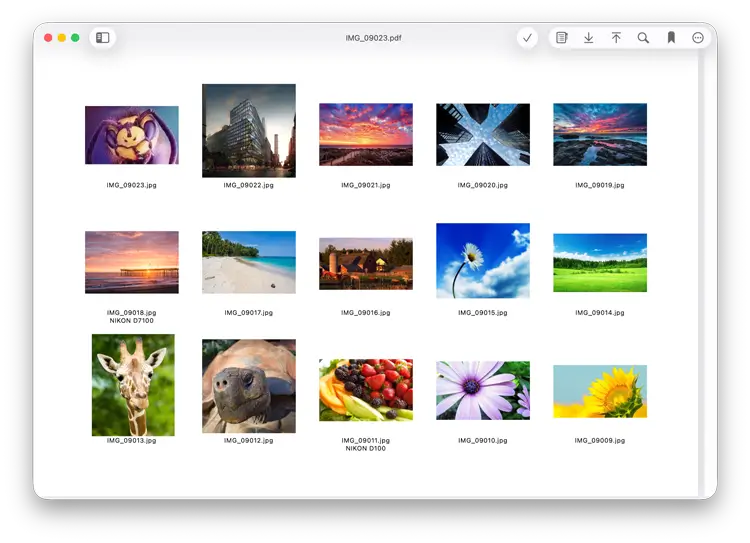
This guide explains how to create photo contact sheets in FileBrowser Pro for Mac by combining multiple images into a PDF with custom layouts, image order, filenames and metadata.
How to create photo contact sheets
Follow our simple step by step guide:
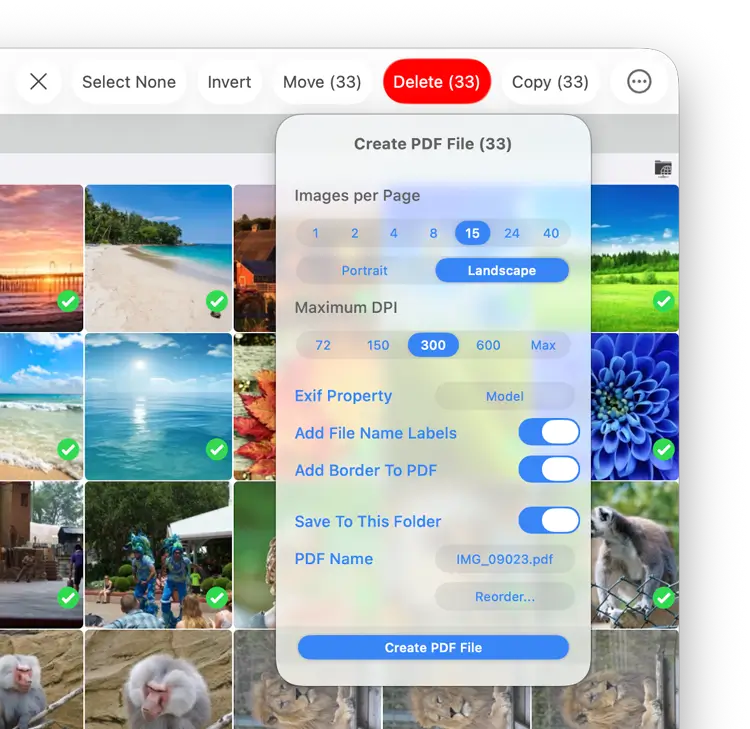
- Select multiple images in a folder and then click the menu icon in the bottom toolbar. Select "Create PDF File".
- Select the number of image you want per page.
- Select your paper orientation, portrait or landscape.
- Choose the quality by selecting DPI.
- Optionally choose an Exif property to add to your file labels
- You can also add the filenames underneath each image for easy reference.
- Reorder - From here you can drag the photos into your prefered order.
- Click "Create PDF File" and the new PDF will be saved into the current folder. If you want to save the PDF to another location uncheck "Save to this Folder" and the file will be copied to your clipboard.
The finished PDF file should look something like this.
You can change the number of images per page, set the orientation of your PDF, change the DPI, reorder the images, add file names to the images and add meta data from the create PDF dialog.