User Guide Full Index
 Getting Started
Connect to...
Getting Started
Connect to...
 Navigation
File Listing Options
Navigation
File Listing Options
 Selecting and Copying Files
- File Selection Mode
- Selecting Images in the Image Viewer
- Copying Files
- Drag and Drop
- AirDrop Files
- Share Files
- eMail Files
 Viewing Documents
Annotate/Markup
Merge PDFs
Viewing Documents
Annotate/Markup
Merge PDFs
 Bulk Rename Tools
- Bulk Rename - Add text to filenames
- Bulk Rename - Find and Replace
- Bulk Rename - Add Indexes / Counter
- Bulk Rename - Rename with Dates
- Bulk Rename - Rename using EXIF Data
 Search
 Working with Images
- Rotate Images
- Convert Images
- Create Contact Sheets
- Rate Photos with XMP
- Remove GPS from Photos
- Edit IPTC Properties on Photos
- Slideshows
 Playing Movies
 Playing Music
 Working with Finder
 WebDAV Server
 Sync and Backup
 Custom Tasks
- Create Custom Tasks
- Monitor a Folder for a Keyword and Download Hourly
- Download PDFs from the Last 7 Days
- Trim PDF Pages
- Change IPTC Properties on Images in Bulk
- Rotate Images in Bulk
- Automated Backup of Video Files from a Chosen Folder
- Automate Backup and Deletion of Files Older than a Chosen Date
- Remove GPS from Multiple Photos
- Convert Images in Bulk
 Advanced
File Automation on Mac Using Custom Tasks
FileBrowser Pro Custom Tasks let you automate file management on Mac. Create powerful file automation workflows for backups, cleanup, and bulk actions across local, NAS, and cloud storage.
This guide explains how Custom Tasks work and how to build reusable file automation to speed up everyday workflows on macOS.
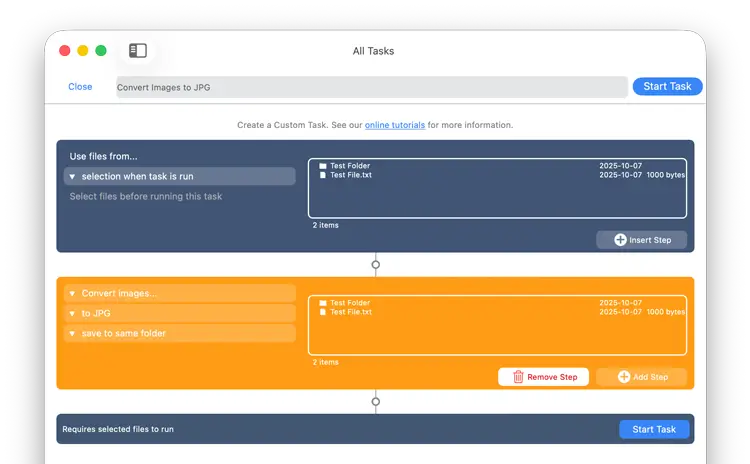
For example, a Custom Task can be applied to selected files to rename images from the last 30 days and copy them to another location. The step-by-step Custom Task builder lets you create workflows ranging from simple to highly complex.
What Files do you Want to Change?
- The currently select files
- The current folder
- A preset folder
What do you Want to do with those Files?
Filter them by type, size or date to limit the changes you make.
Include just the files, the folders or include everything including subfolders.
Compare the contents of a folder to another folder
Move, Copy, Rename and Delete files.
PDFs: Merge Pdfs, Trim PDF pages and create PDFs from images
Images: Rotate, convert, scale and crop images in bulk.
Set image EXIF and IPTC properties in bulk
Example Custom Tasks
See one of our example Custom Task examples.
- Monitor a Folder for a Keyword and Download Hourly
- Download PDFs from the Last 7 Days
- Trim PDF Pages
- Change IPTC Properties on Images in Bulk
- Rotate Images in Bulk
- Automated Backup of Video Files from a Chosen Folder
- Automate Backup and Deletion of Files Older than a Chosen Date
- Remove GPS from Multiple Photos
- Convert Images in Bulk